
The Best AI Podcast Tools for Keeping Real Voices
Helping Translators, and Making Smooth “Takeover” Voiceovers
Podcast AI tools often do two different jobs. First, some tools turn notes into a podcast-like audio summary (good for fast drafts). Second, some tools edit real interviews, keep people’s voices consistent, and help you translate with human review (good for release-quality work). NotebookLM mostly helps with the first job. It can make “Audio Overviews” in 80+ languages, but it is not built to keep a real guest’s exact voice identity.
For Podocracy-style episodes—where you hear the real speaker for a
moment, then a clean AI voice takes over smoothly—this report finds
three strong paths:
– Podocracy.win’s “AI voice overlay” path:
It describes generating a realistic AI voice from improved translated
text and overlaying it with the original audio to keep an
“interview-like” feel. It also supports manual tuning, “custom
improvement instructions,” and even a record-your-own-voice option where
it handles “pauses, voice levels and alignment.”
– Editor-first path (Descript or Async):
Translate, edit text with timestamps, regenerate lines, and do quick
fixes. Descript supports “Dub speech,” offers a “Match timing” option,
and shows which plans include “translation proofread.” Async has
text-based editing from transcripts plus dubbing and voice cloning
features.
– Voice-engine path (ElevenLabs + a transcript/timestamp layer):
Use speech-to-speech “voice changer” to replace only the parts you need
while keeping emotion and pacing, then do careful crossfades in an
audio editor for the smooth takeover effect.
For teams shipping
in many languages, the most reliable pattern is: diarized transcript +
word timestamps → translator review + re-record options →
segment-by-segment synthesis/overlay → crossfade and loudness polish →
legal disclosure and consent archive.
The tools compared and what each one is best for
This post compares nine tools and platforms you asked for: NotebookLM, Podocracy.win, ElevenLabs, Descript, Async/Podcastle, Wondercraft, OpenAI, Microsoft Azure Speech, and Amazon Polly. A simple way to understand the list is to put them into three buckets:
Tools that “draft a podcast” from text or documents
- NotebookLM: Generates Audio Overviews and lets you change output language; interactive mode is currently English-only.
- Wondercraft: Turns text/docs into podcast audio with a timeline editor; also has an API that can generate podcasts with chosen voice IDs.
Tools that help you edit interviews and manage translator review
- Podocracy.win: Built as an end-to-end workflow for translators, including manual tuning and overlaying AI voice with original audio, plus optional re-recording in your own voice.
- Descript: Editor workflow with translation + dubbing options and plan-based “translation proofread.”
- Async/Podcastle: Text-based editing from transcript, plus dubbing and voice cloning; help docs list transcription languages for Text Mode editing.
Voice engines and APIs you build into your own pipeline
- ElevenLabs: Voice changer (speech-to-speech) and request stitching for consistent “speech melody,” plus data residency and optional zero retention for enterprise.
- OpenAI: APIs for word timestamps, diarization output formats, plus consent-gated custom voices.
- Azure Speech: Custom Neural Voice is limited access and requires a recorded consent statement for professional voice; custom voices are not supported for local export (cloud-managed).
- Amazon Polly: Large set of voices with different engines (standard, neural, long-form, generative), with published per-character pricing; “Brand Voice” is a custom engagement.
How the voice tech works in plain words
You can think of this tech like a movie dub, but for podcasts.
Voice cloning
Voice cloning means: “Here is text. Please say it in this person’s voice.” Some tools do this inside an editor (like Descript Overdub) and some do it as an API (like OpenAI custom voices or Azure Custom Voice). Descript also requires explicit recorded authorization for custom AI speakers.
Voice conversion
Voice conversion (also called speech-to-speech) means: “Here is a real recording. Please keep the speaking style (laughs, pauses, emotion) but change the voice identity.” This is especially useful when a translator wants to re-record a line in their own voice (or a voice actor’s voice) and then convert it into the guest’s cloned voice shape. ElevenLabs describes its voice changer as keeping emotion and delivery, and even fixing specific words and phrases in existing audio.
Prosody transfer and “keeping the speech melody”
Prosody is a fancy word for the “music” of how we speak: speed, stress, and tone. When you generate audio in small chunks, you can get weird jumps in that “speech melody.” ElevenLabs documents “Request Stitching” as a way to keep prosody consistent across chunks.
Cross-fading for the smooth handoff
Your special style—real voice at the start, then AI voice takes over—needs audio mixing.
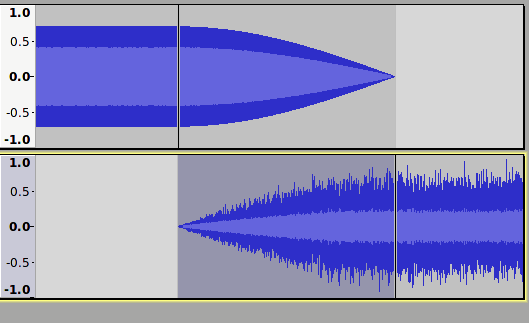
A crossfade means two clips overlap for a moment: one fades out while the other fades in, so the change feels smooth. Audacity’s guide explains crossfading with an overlap and a transition that can be shorter or longer depending on taste.
“Neural concatenative” methods like VALL‑E
Older speech systems sometimes stitched together small recorded sounds like puzzle pieces.
Newer systems can do something similar but with AI “sound tokens.” The VALL‑E paper describes generating speech using discrete audio codec codes (think: tiny sound symbols) and reports improvements in both naturalness and speaker similarity, even with a short prompt.
This matters because it explains why modern voice tools can sound close to a real person with little enrollment audio—but it also raises deepfake risk, so consent matters.
Translator-friendly workflows that actually work
Translation is not just “translate the words.” It is also: timing, emotion, speaker identity, and a human who checks meaning.
Below are the key workflow parts that matter most for a translator team.
Transcript + speaker labels
For interviews, you want to know who spoke when (speaker labels). This is called diarization.
OpenAI’s transcription docs describe output formats where diarized_json is required to receive speaker annotations for the diarization model.
Word timestamps for precise edits
A translator should be able to click a word and jump to the audio.
OpenAI’s “Speech to text” guide explains timestamp_granularities[] for segment and word timestamps. The API reference also notes that word timestamps can add latency.
Descript and Async also support text-based editing workflows that depend on transcripts. Async’s help docs explain “Text Mode” editing from a transcript and list transcription languages for that feature.
In-app editing and “match timing” translation
When you dub speech, translated lines can be longer or shorter than the original.
Descript’s “Translate and dub speech overview” describes two styles:
- “Match timing” (tries to match the original speaking time at a natural pace)
- “Direct translation” (more literal, then audio may be sped up or slowed down)
Podocracy.win describes “Custom Improvement Instructions” and “Manual Tuning,” which is a clear human-in-the-loop approach: the translator edits text until it is right, then the system voices it.
Re-recording with your own voice
Sometimes you need a human voice performance, not just typed text.
Podocracy.win says you can record your own voice and overlay it over the original audio, and it will handle “pauses, voice levels and alignment.”
For other pipelines, a strong pattern is:
- Translator records the corrected translated line.
- Speech-to-speech conversion maps it into the target speaker identity.
- The editor places it using timestamps and fades.
ElevenLabs’ voice changer is explicitly positioned for transforming audio while preserving performance nuance and also for replacing specific words and phrases.
How to judge quality with simple metrics
You do not need an audio PhD to measure quality. You just need to be consistent.
Naturalness: MOS
MOS is basically: “How good does it sound to people?” People rate samples, then you average the scores.
The International Telecommunication Union publishes a recommendation (P.800.1) focused on MOS terminology for audio quality scoring.
Simple podcast rule: if your team’s MOS-style listening scores drop after a tool update, something broke.
Intelligibility: WER
WER is: “How many words got recognized wrong?” Lower is better.
Azure Speech documentation calls WER the “industry standard” and explains it as incorrect words divided by total words.
A practical trick: run speech-to-text on your final audio. If the transcript has lots of errors, listeners may struggle too.
Speaker similarity: “Does this sound like them?”
This is the hardest one. It is often judged by humans.
The VALL‑E paper reports improved “speaker similarity” in its experiments, which is the same idea: do people think it sounds like the same speaker?
For podcast teams, a simple test is: have 5 people listen blind and vote “real / not real” and “speaker A / not speaker A.”
Latency: “How long do changes take?”
Latency matters when translators are doing many small fixes.
OpenAI’s transcription reference warns that generating word timestamps adds latency compared to segment-only timestamps.
If you want fast review cycles, use segment timestamps while drafting, then word timestamps for final polish.
Short transcript examples of the “takeover” style
These are short and safe examples you can copy into your scripts.
Example A: Same-language takeover (English)
[Real voice, 1 second] “When we tested the pilot…”
[Crossfade 150 ms]
[Synth voice] “…we learned that simpler onboarding kept more listeners through the first week.”
Example B: Translation takeover (English to Spanish)
[Real voice, 0.7 seconds] “The biggest lesson was…”
[Tiny pause, no overlap]
[Synth voice in Spanish] “…que la claridad gana cuando reduces pasos y repites la idea principal.”
Tip: if the language changes, avoid overlapping languages in the crossfade. A tiny gap often sounds cleaner.
Legal, ethical, and privacy rules you must plan for
Voice tools are powerful. That also makes them risky.
Consent is not optional
Descript requires explicit recorded authorization for custom AI speakers.
OpenAI’s voice creation flow is consent-gated too:
- You can upload a “voice consent recording” through
POST /audio/voice_consents. - Creating a custom voice requires a “consent recording” and a sample recording, and the “Create voice” endpoint takes a consent recording ID.
A Stripe newsroom story describing Descript’s process also says the consent statement is matched with a voice fingerprint and checked by humans.
Deepfake risks and EU AI Act transparency
In the European Union, Regulation (EU) 2024/1689 (the AI Act) includes transparency steps for synthetic content. One key line says providers of AI systems generating synthetic audio must ensure outputs are marked in a machine-readable way and detectable as AI-generated or manipulated.
The AI Act also discusses “deep fakes” transparency obligations and says the disclosure should be done in a way that does not ruin the viewing or enjoyment of works.
For Podocracy-style publishing, this usually means:
- Keep a clear internal record of what audio was generated.
- Add a short disclosure in show notes (and sometimes in the episode) when you used AI voice.
GDPR and voice as sensitive data
If you create voiceprints or voice identities, you may be handling biometric-like data.
GDPR Article 9 says processing biometric data “for the purpose of uniquely identifying a natural person” is prohibited unless an exception applies.
You should talk to counsel for your exact case, but the safe design idea is: collect the minimum voice data you need, store it securely, and document consent.
Data residency and “zero retention”
If you work with sensitive interviews (health, kids, legal, whistleblowers), you may need stricter controls.
ElevenLabs documents “Data residency” and says enterprise customers can enable “Zero Retention Mode” so sensitive content is not retained on their servers (for the supported products).
Comparison table and recommended workflow for Podocracy-style episodes
Comparison table
Voice-cloning fidelity (plain meaning): how closely the tool can match a real person’s voice when generating new lines.
Scale: None / Limited / High / Enterprise-controlled.
| Tool | What it’s best for | Translator review + re-recording help | Interview-style “real voice → AI takeover” support | Supported languages (from official docs) | Pricing basics (official) | Cloud vs on‑prem | API ready? | Voice-cloning fidelity | Key sources |
| NotebookLM | Fast “podcast-like” drafts from your sources | Review happens outside (you can regenerate, but not a full translator workstation) | Not built for real speaker identity; best as a draft layer | Audio Overviews in 80+ languages; interactive mode currently English-only | Included in Google AI Pro $19.99/month | Cloud | Not the main focus for custom pipelines | None | [34] |
| Podocracy.win | End-to-end podcast translation workflow for translators | Manual tuning + improvement instructions; optional record-your-own-voice overlay with alignment | Describes “Realistic AI Voice Overlay” over original audio for interview feel | Not clearly listed on the accessible page | Public post says “starting at $9/hour” | Cloud | Mentions an API version on page | Not stated (focus is overlay feel) | [35] |
| ElevenLabs | High-quality voice conversion + consistent voice generation | Great for “fix just this line” and performance-preserving replacements | Strong when paired with timestamps + crossfades | Voice changer multilingual models: 29 languages listed | Free; Starter $5/mo; Creator $22/mo (promo may show $11 first month); Pro $99/mo | Cloud; enterprise controls | Yes (voice changer + TTS APIs) | High / Enterprise-controlled | [36] |
| Descript | Translator-friendly editing-by-text with dubbing | “Dub speech,” “Match timing,” plan-based “translation proofread” | Medium (excellent segment edits; the cleanest takeover is usually done after export) | Transcription in 26 languages (Latin alphabet focus) | Creator $24/person/mo; Business $50/person/mo | Cloud | Product-first (not a general TTS API) | High (consent-checked) | [37] |
| Async/Podcastle | All-in-one editor + text editing + dubbing | Text Mode editing from transcripts; dubbing and voice cloning | Medium (good building blocks; final handoff polish in editor/DAW) | Text Mode transcription: EN/ES/DE/FR/IT; dubbing page claims 30+ languages | Free tier shown; other pricing is dynamic; separate voice API pricing is clear | Cloud | Yes (voice API pricing page) | High (instant voice clone) | [38] |
| Wondercraft | Polished AI podcasts with timeline editor | Script editing + collaboration; API supports multi-voice podcasts | Medium to strong (multi-voice generation; takeover effect needs crossfade step) | Claims “any language or accent” for voices (no full list shown) | Creator $21/mo; Pro $45/mo; includes API access | Cloud | Yes (podcast endpoints with voice_ids) | High | [39] |
| OpenAI | Core building blocks: diarization + timestamps + consented voices | Great for building your own translator web app with alignment | Strong as infrastructure; you do the final mixing | Uses BCP‑47 language tags for consent; model language coverage varies | Official pricing page shows token-based audio pricing for realtime models | Cloud | Yes (full API) | Enterprise-controlled (consent gated) | [40] |
| Microsoft Azure Speech | Enterprise custom voices (with approvals) | Platform-level; translator UX is typically custom-built by you | Component-level: you still edit/mix elsewhere | Language varies by service/region | Usage-based; custom voice is limited access | Cloud for custom voice; containers for subset features | Yes | Enterprise-controlled | [41] |
| Amazon Polly | Large voice catalog + clear pricing | Platform-level; you build the workflow | Component-level: you still edit/mix elsewhere | Many languages listed in “available voices” table | Standard $4 / 1M chars; Neural $16; Long-form $100; Generative $30 | Cloud | Yes (simple API) | Enterprise (Brand Voice) / Standard voices are not clones | [42] |
Recommended workflow for interview-style episodes
This workflow is designed for:
- real interviews
- translator review
- re-recording when needed
- “real voice at paragraph starts, then AI takes over smoothly”
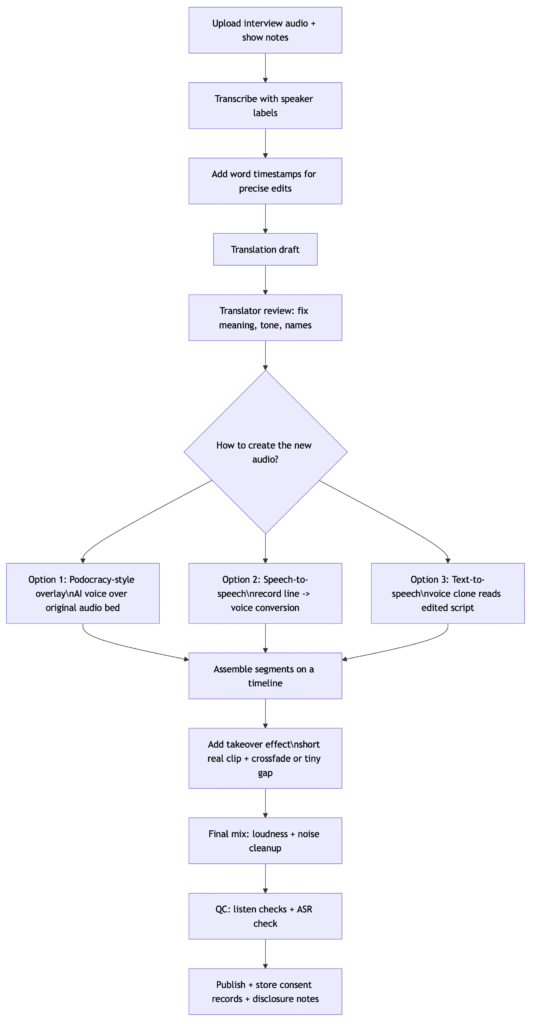
Key building blocks for this workflow are all described in official docs: diarized transcripts and timestamps for precision editing, and voice overlay/voice conversion for the “takeover” sound.
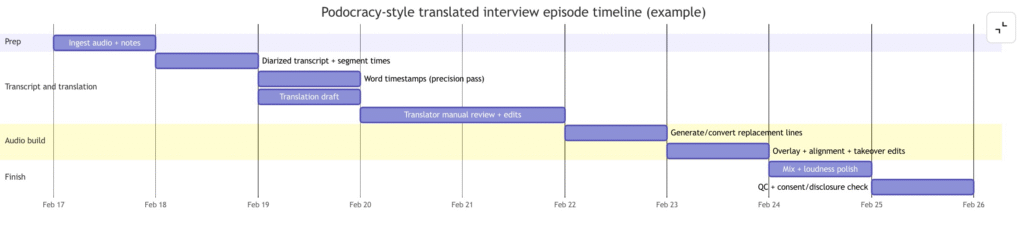
Production timeline example
This is a simple schedule for one episode with one target language. Bigger shows can parallelize steps.
Simple implementation steps and useful tools
Step one: get a transcript you can trust.
Use
diarization (who spoke when) and timestamps. OpenAI documents diarized
JSON output formats and word timestamps, and Descript/Async depend on
good transcripts for text-based editing.
Step two: translate, then let a human fix it.
Podocracy.win
explicitly supports manual tuning and improvement instructions.
Descript provides “Match timing” for better natural pacing and offers a
“translation proofread” feature on higher plans.
Step three: pick the voice method per sentence.
- If you want the “original audio is still there” vibe: use an overlay approach like Podocracy.win describes.
- If you want the best emotion match on fixes: use speech-to-speech conversion like ElevenLabs voice changer.
- If you want clean narration: use voice cloning TTS (Descript, Wondercraft, ElevenLabs, OpenAI custom voices, or enterprise voices from Azure/Polly).
Step four: create the takeover effect with crossfades.
Use an audio editor and crossfade. Audacity’s guide shows the overlap-and-fade method.
Step five: ship safely.
Keep consent records
(Descript and OpenAI both emphasize consent recordings), and plan for AI
disclosure rules, especially in the European Union where the AI Act
includes marking duties for synthetic audio.